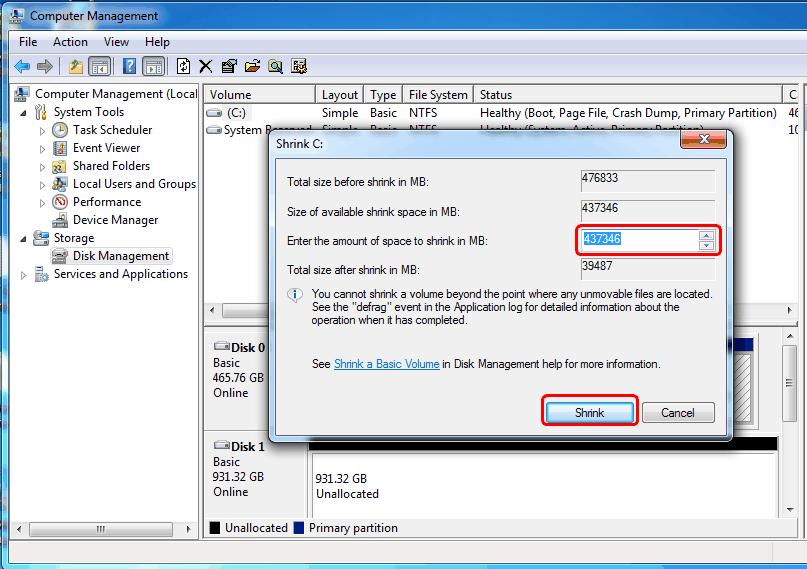
How to Shrink a Windows 7 Hard Drive Partition and Create New Drives
Learn how to shrink a Windows 7 partition, create new drives using Disk Management and DiskPart, and resolve the "You...
Read Guide

Diagnose and fix common computer problems with our IT troubleshooting guides.
Find step-by-step solutions for Windows errors, audio issues, printer problems, and network connectivity.
Each guide includes clear instructions you can follow without technical expertise.
27 tools available
Related: Windows
Use our Windows Sound & Audio Troubleshooter to fix no-sound and audio device issues.
Browse our library of Windows Cryptographic Services error fixes and other step-by-step troubleshooting guides below.
Windows Troubleshooting
Learn how to shrink a Windows 7 partition, create new drives using Disk Management and DiskPart, and resolve the "You...
Read GuideLearn how to fix Windows Cryptographic Services errors, such as “Object was not found” and Error Code 2148073489. Thi...
Read Guide
Describe a Windows error and get an ordered, numbered fix plan: what to check first, the exact commands to run, and when to stop and get professional help.
Use Tool
Describe what your printer is doing — offline, jamming, streaking or showing a driver error — and get an AI diagnosis with the checks most likely to fix it.
Use Tool
AI-assisted Outlook PST and OST file repair guide. Fix corrupted Outlook data files, resolve 0x80040119 errors, and recover email data with expert guidance.
Use Tool
Paste your BSOD screen text, stop code or minidump output and get an AI root-cause analysis of the driver, memory or hardware fault behind the crash.
Use Tool
AI-powered Windows Event Log analyzer. Paste any Event ID or log details for intelligent analysis, root cause identification, and step-by-step resolution guidance.
Use Tool
Find out what any file extension means and how to open it. Search our database of 100+ file formats including documents, images, video, audio, archives, and more.
Use Tool
Search a database of Windows error codes, BSOD stop codes, Win32 HRESULTs and Device Manager codes. See what each code means, its common causes and the fixes to try.
Use Tool
Learn how to read a Windows error code: what the 0x prefix, HRESULT, NTSTATUS and stop codes mean, where to find the full code, and how to turn it into the right fix.
Use Tool
Look up BSOD stop codes in a searchable database. See what each bug check means, its common causes and the fixes to try, from MEMORY_MANAGEMENT to INACCESSIBLE_BOOT_DEVICE.
Use Tool
Step-by-step guide to flush DNS cache, reset network stack, renew IP configuration, and troubleshoot common internet connectivity issues on Windows.
Use Tool
Learn how to use System File Checker (SFC) and DISM tools to repair corrupted Windows system files, fix DLL errors, and restore system stability.
Use Tool
Use CHKDSK and disk diagnostic tools to check hard drive health, repair bad sectors, fix file system errors, and prevent data loss on Windows PCs.
Use Tool
Comprehensive guide to diagnose and fix network connectivity issues including Wi-Fi problems, limited connectivity, IP conflicts, and DNS errors on Windows.
Use Tool
Troubleshoot and fix common Windows Update errors including stuck updates, 0x80070002, 0x800F081F, and update installation failures.
Use Tool
Master Windows Task Manager and Performance Monitor to identify resource hogs, analyze system performance, manage startup programs, and optimize PC speed.
Use Tool
Step-by-step solutions for Windows boot failures including black screen, infinite loading, automatic repair loop, safe mode access, and boot configuration fixes.
Use Tool
Test your computer RAM for errors using Windows Memory Diagnostic tool. Identify faulty memory modules causing crashes, freezes, and blue screen errors.
Use Tool
Identify outdated, missing, or faulty drivers. Learn how to update, roll back, and reinstall drivers to fix hardware issues, device manager errors, and improve stability.
Use Tool
Learn safe ways to clean and optimize the Windows Registry. Fix registry errors, remove orphaned entries, and improve system performance without risking stability.
Use Tool
Resolve Windows activation errors including 0xC004C003, 0x803F7001, license expired messages, and product key issues. Step-by-step activation fix guide.
Use Tool
Free up disk space and optimize storage on Windows. Remove temporary files, clear system cache, uninstall bloatware, and use Storage Sense for automatic cleanup.
Use Tool
Configure Windows Defender (Microsoft Defender) for maximum protection. Run offline scans, configure firewall, enable ransomware protection, and remove malware.
Use Tool
Fix no sound, audio device not detected, microphone not working, and other Windows sound issues. Update audio drivers and configure playback devices.
Use Tool
Manual step-by-step fixes for a printer that is offline, stuck in the queue or crashing the Print Spooler on Windows 10 and 11, with the exact reset commands.
Use Tool
Optimize Windows power settings, disable unnecessary startup services, adjust visual effects, and configure power plans for maximum performance on desktop and laptop.
Use Tool
Recover deleted files, restore previous versions, use File History backup, and recover data from corrupted drives using built-in Windows recovery tools.
Use Tool
Configure Windows virtual memory and page file settings for optimal performance. Fix low memory errors, adjust paging file size, and manage RAM effectively.
Use ToolStart by selecting the category that matches your issue - Windows, audio, printer, network, or email.
Each guide walks you through the diagnosis step by step.
Look for error codes or specific symptoms to narrow down the right guide.
If you are not sure where to start, try the Windows Sound & Audio Troubleshooter or browse the general Windows guides first.
Most fixes take under 10 minutes and require no special tools.